Choosing between TrendSpider vs TradingView often comes down to one question: which platform gives you the better stock screener for the way you trade or invest?
But they do not approach stock scanning in the same way. One focuses heavily on code-free scan building, automated chart patterns, and AI assistance included on every paid tier. The other utilizes a massive, newly upgraded Screener 2.0 engine that pairs deep fundamental data with multi-timeframe overlays and global exchange coverage.
If you are comparing TrendSpider vs TradingView stock screener, the key differences are ease of use, scan depth, market coverage, and how much manual setup is required.
Quick Answer: Best Stock Screener
TradingView is a solid choice if you want an excellent free (limited) daily screener, or if you need an affordable mid-tier option that pairs deep fundamental data with massive global exchange coverage.
TrendSpider is the ideal option if you want to build advanced, code-free technical scans using automated chart patterns, alternative US market data, and natural language AI prompts included across all subscription tiers.
- Best for free basic stock screening: TradingView
- Best for AI-assisted scanning on budget tiers: TrendSpider
- Best for algorithmic technical filters & alternative US data: TrendSpider
- Best for multi-market global screening & deep fundamentals: TradingView
Improve Your Trading With the Best Stock Screener For You.
Each platform offers unique strengths to help you find profitable trading opportunities. Why not give them a try and see which is best for your needs.
What Traders Actually Need From a Stock Screener
When people search for a stock screener, they usually want more than a list of tickers. They want a tool that can answer questions like:
- Which stocks just had a bullish EMA cross?
- Which names are near 52 week highs?
- Which stocks meet both technical and fundamental rules?
- Which setups happened recently, not months ago?
- Can I scan an index, an ETF, or my own watchlist?
- Can I save the scan, automate it, and get alerted when matches appear?
That is where the difference between these two tools becomes more obvious. A scanner is not just about filters. It is about how fluidly you can express your unique trading strategy and seamlessly integrate it into your daily analysis routines.
TrendSpider Market Scanner: Where it Stands Out
TrendSpider is built around the idea that complex market scans should be easier to create and easier to run at scale.
Its scanner supports:
- AI-based scan creation using plain language
- Technical conditions such as EMA crosses and moving average relationships
- Fundamental filters
- Multiple time frame logic
- Condition groups for more advanced setups
- Custom scripts and indicators
- Scanning across major exchanges, ETF holdings, and watchlists
- Scheduled scans with email delivery
Natural language scan building
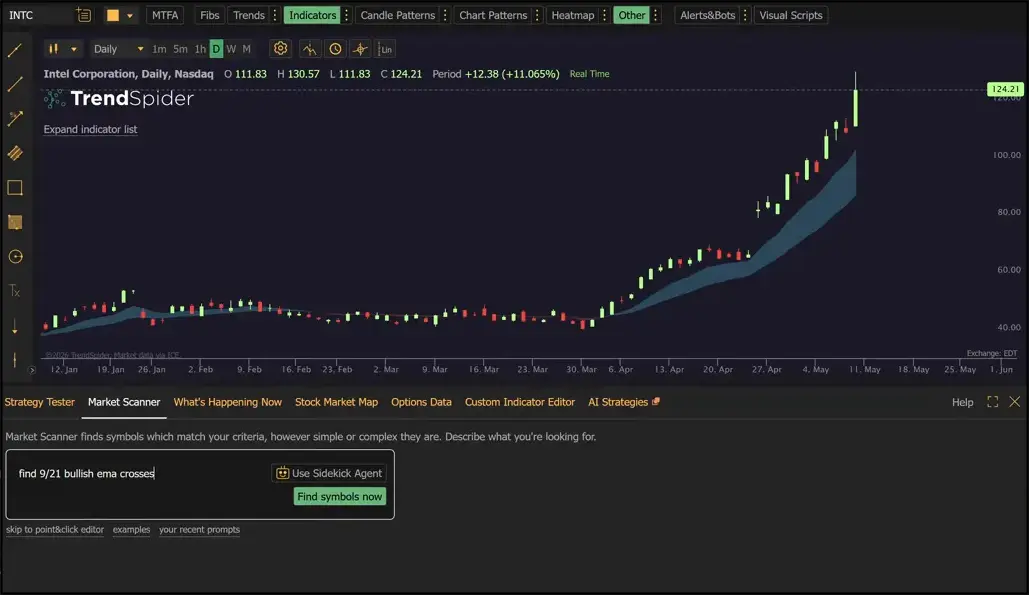
One of the biggest advantages is how quickly a scan can be created. Instead of manually piecing together every rule, you can enter a request such as a bullish EMA crossover and generate a working scan directly from that prompt.
You can also refine the logic by adding timing conditions, such as requiring the event to happen within the last number of candles, or by checking the current candle for real-time screening.
This matters because many traders know what they want to find, but do not want to spend time hunting through menus to build it one rule at a time.
Advanced multi-factor scans
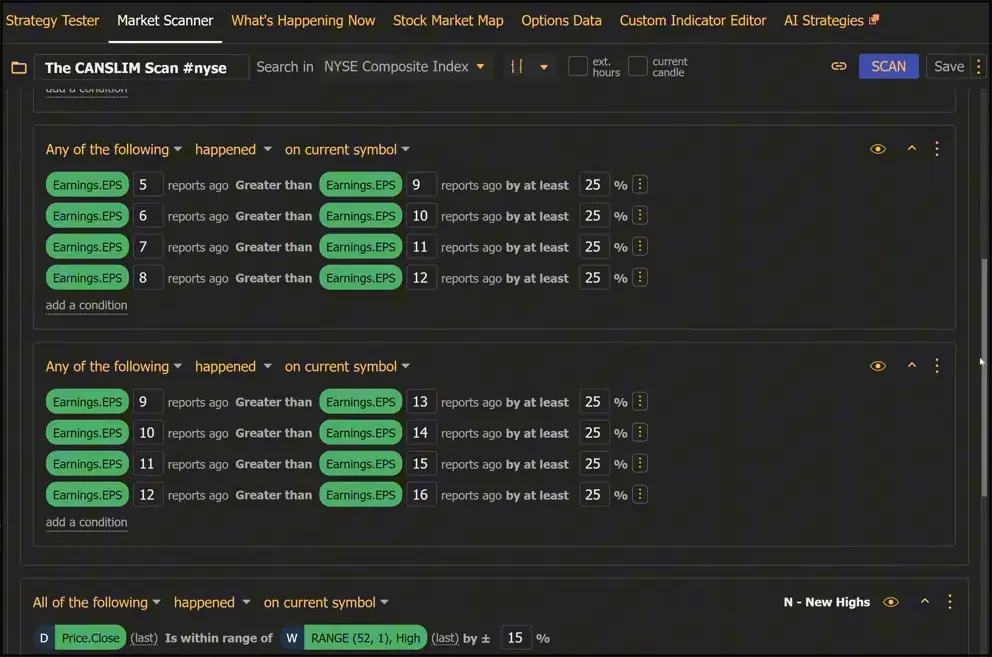
TrendSpider is also designed for more complex screeners that combine different data types. A good example is a CAN SLIM-style screen that blends:
- Multi-year EPS growth requirements
- Price proximity to a 52 week high
- Increasing average monthly volume
- Relative performance thresholds
- Recent analyst buy activity
- Price above a rising 200 day moving average
That kind of mixed technical and fundamental logic is where TrendSpider separates itself. It is not limited to a handful of simple filters.
Custom indicators and scripts
Another notable strength is the ability to use custom scripts in the scanner. TrendSpider also includes access to many ready-to-use indicators in its store, including scans based on well-known methodologies such as:
- Minervini Trend Template
- Minervini VCP
- Weinstein Stage Analysis
- CAN SLIM
Some custom indicators can register a signal that becomes usable inside the scanner. That means you can create or import a signal-driven setup and then search for it across a broad universe of stocks.
Broad market coverage
TrendSpider can scan:
- Major exchanges such as NYSE and NASDAQ NMS Composite
- Live ETF holdings
- Personal watchlists
- Large symbol universes with thousands of names at once
That broader coverage is important for traders who do not want to constantly break searches into smaller lists.
Automation and workflow features
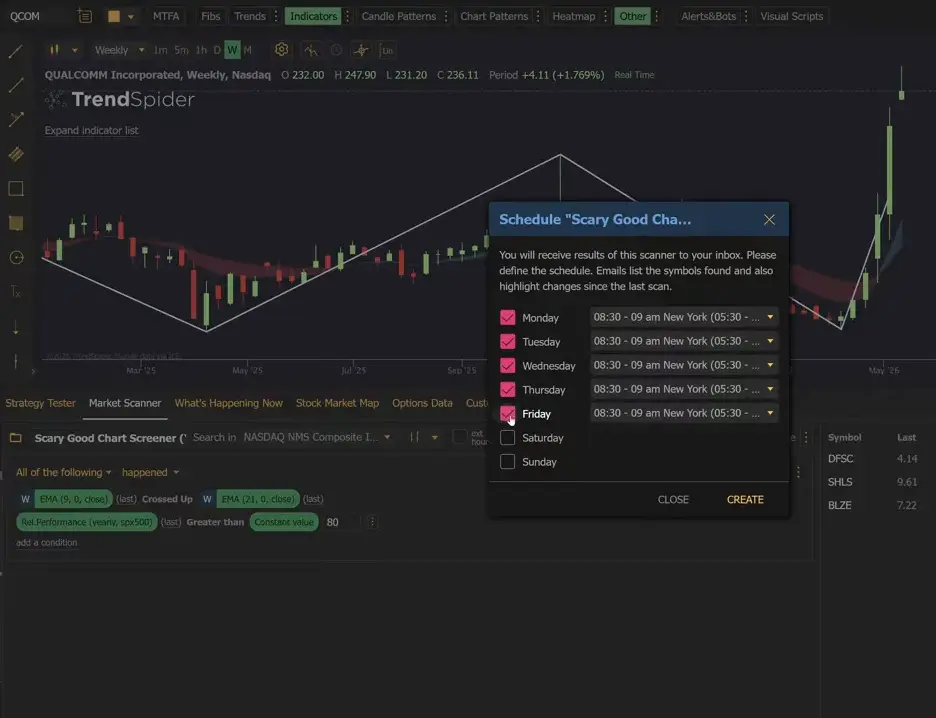
TrendSpider goes beyond one-time filtering. You can schedule scans and send results directly to email. You can also use a scanner as a working watchlist alongside your charts.
That turns the scanner into part of a repeatable process instead of a one-off research tool.
Prebuilt scan library
For anyone who does not want to start from scratch, TrendSpider includes over 100 ready-made scans in its store. These can be imported and used without manually rebuilding every condition.
This is especially useful if you want to test proven screening frameworks quickly or adapt an existing template to your own rules.
TradingView Stock screener
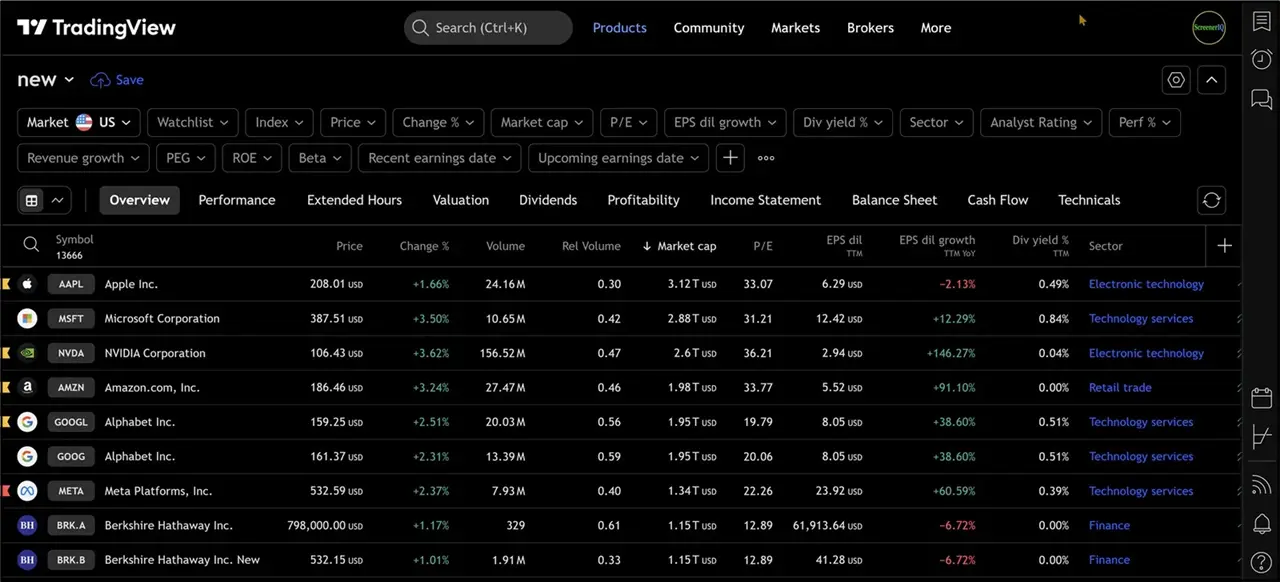
TradingView offers a highly versatile financial ecosystem with a stock screener that scales smoothly from straightforward filtering to institutional-grade fundamental analysis. Its core strengths lie in its massive data coverage, cost-efficiency, and all-in-one charting ecosystem:
- An industry-leading free basic stock screener is available.
- Powerful multi-timeframe technical overlays paired with deep corporate financial statements.
- Exceptional versatility for macro data tracking, global market scans, and long-term investing setups.
Good For Highly Structured Screening
If your strategy focuses on traditional technical indicators paired with underlying corporate financial health, TradingView provides immense depth.
For example, building a screen to filter global companies based on a moving average crossover while cross-referencing their debt-to-equity ratio or revenue growth is highly efficient. This makes it an invaluable tool for retail swing traders and professional macro investors alike.
Limitations
The differences become clearer once you try to replicate more advanced scans.
Building the same kind of EMA crossover screen that TrendSpider can generate from a prompt requires a more manual process in TradingView. You need to add the relevant field, navigate technical settings, and construct the filter step by step.
That is not necessarily a problem for standard setups, but it requires more deliberate, hands-on configuration if you want to quickly build highly customized technical logic.
Tradingview Pine Screener
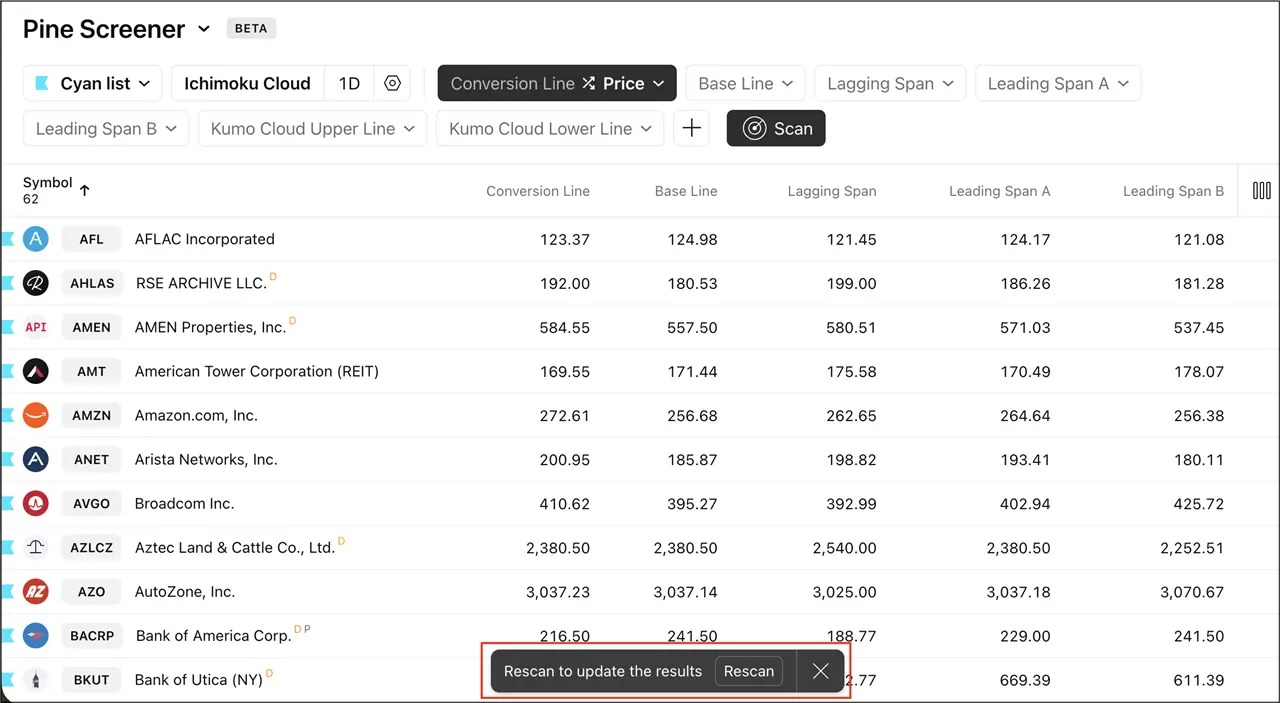
For more advanced screening in TradingView involves using the Pine Screener.
This requires knowledge of thier Pine Script coding language. A skill most traders don’t have.
TrendSpider vs TradingView Comparison: Key Features
1. Ease of Building a Scan
TrendSpider: Designed for rapid, code-free creation by allowing you to describe a trading setup in plain English to automatically generate or edit the scan using its built-in AI assistant.
TradingView: Uses a more manual, column-driven filtering process. While highly intuitive for standard filters, it requires more step-by-step assembly when building highly detailed or customized conditions.
The Verdict: TrendSpider is the faster choice for quickly generating technical setups from scratch, while TradingView works beautifully for traders who prefer a structured, hands-on approach to filter configuration.
2. Technical Plus Fundamental Logic
TrendSpider: Exceptional for complex technical scanning, automated chart pattern recognition, and tracking alternative US market data like dark pools alongside fundamental data.
TradingView: Features a massive, upgraded data matrix through Screener 2.0 that lets you scan for deep corporate financial statements and balance-sheet formulas right alongside technical indicators.
The Verdict: TrendSpider is the go-to for technical setups and alternative sentiment, while TradingView is the ultimate Swiss Army knife for combining multi-timeframe price action with institutional-grade fundamentals.
3. AI Capabilities
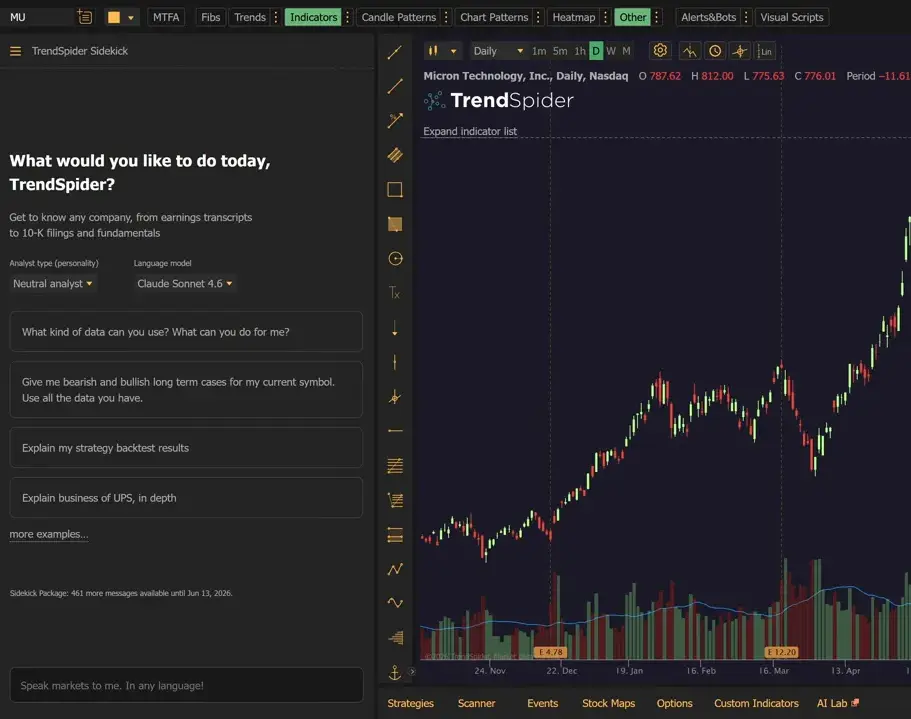
TrendSpider: Integrates its Sidekick AI assistant directly across all paid plans, allowing any user to build, refine, and analyze complex technical scans using natural language prompts.
TradingView: Features a powerful conversational AI natural language filter inside Screener 2.0, but restricts access exclusively to its top-tier Ultimate subscription.
The Verdict: TrendSpider is the choice for accessible AI scan creation on standard tiers, while TradingView offers equivalent power but reserves it strictly for premium enterprise-level users.
4. Universe Size and Market Coverage
TrendSpider: Allows users to scan major US indexes, live ETF components, and custom watchlists containing thousands of assets simultaneously.
TradingView: The Screener 2.0 engine scans tens of thousands of global assets simultaneously across hundreds of international exchanges.
The Verdict: TrendSpider wins for deep, US-centric market data and ETF tracking, while TradingView is the undisputed champion for international market reach.
5. Prebuilt Scans and Templates
TrendSpider: Offers a robust built-in library of over 100 marketplace templates based on iconic strategies like CAN SLIM, Minervini VCP, and Weinstein Stage Analysis.
TradingView: Provides an extensive set of popular community scripts and built-in conceptual screens (like “Most Volatile” or “Overbought”) that can be customized to fit your strategy.
The Verdict: TrendSpider provides a cleaner out-of-the-box experience for classic technical frameworks, whereas TradingView relies on a more manual, community-driven customization model.
Who Should Choose TrendSpider?
TrendSpider is likely the better fit for your trading workflow if you prioritize technical automation, alternative data, and rapid setup within the US markets:
- You want affordable, plan-wide AI scanning: You plan to create or modify technical setups using plain-language AI prompts without paying for a top-tier enterprise plan.
- You track smart money and market sentiment: You want a scanner natively equipped to filter assets based on alternative feeds like real-time Dark Pool volume, short interest, and unusual options flow.
- You heavily rely on automated chart patterns: Your strategy requires scanning the market for automated candlestick patterns, trendlines, or multi-timeframe Fibonacci levels.
- You want fully automated workflows: You want to turn your active scan criteria into dynamic watchlists, schedule automated email scan alerts, or route signals directly to a trading bot.
- You prefer ready-made marketplace templates: You want instant access to a library of over 100 pre-built scans modeled after iconic technical frameworks like Minervini VCP or Weinstein Stage Analysis.
Who Should Choose TradingView?
TradingView makes more sense for your workflow if you want a highly versatile financial ecosystem with institutional fundamental data and massive international market reach:
- You want an industry-leading free daily screener: You are looking for a highly capable, zero-cost screener for long-term investing, or you want to test the water with standard filters before upgrading.
- You require deep fundamental and corporate data: Your screening strategy relies heavily on balance-sheet data, income statements, evaluation metrics, and institutional financial filings alongside your technical indicators.
- You trade global international markets: You need a scanner that can search across hundreds of global exchanges outside of the US (such as European, Asian, or African markets) in a single pass.
- You prefer a structured, hands-on filter setup: You enjoy building custom math expressions and configuring your columns manually rather than relying entirely on pre-built scripts or AI automation.
- You want an all-in-one chart and research hub: You prefer having a unified, world-class charting platform where your multi-market screener interacts perfectly with your day-to-day swing trading or investing setups.
Final Verdict
Choosing between TrendSpider vs Tradingview isn’t about which tool is more advanced; it’s about choosing the right workflow for your specific trading style.
Pick TradingView if you want an all-in-one global research hub. It is the ideal choice for swing traders and investors who need deep corporate fundamental tracking, manual filter customization, and the ability to scan massive international asset classes simultaneously.
Choose TrendSpider if you are an active, technical-first US trader. It is the premier option if you want plan-wide conversational AI scan generation, automated chart and pattern recognition, and specialized access to alternative US market feeds like dark pools and institutional options flow.
Improve Your Trading With the Best Stock Screener For You.
Each platform offers unique strengths to help you find profitable trading opportunities. Why not give them a try and see which is best for your needs.
FAQ
Q: Is the TradingView screener free?
A: Yes. TradingView provides a highly capable, zero-cost stock screener on its basic free tier, making it an excellent starting option for standard market filtering. But the free version is limited.
Q: Can TrendSpider build scans with AI?
A: Yes. TrendSpider includes its conversational Sidekick AI assistant across all paid subscription tiers, allowing you to generate or edit detailed technical filters using plain English prompts.
Q: Can both platforms scan technical indicators?
A: Yes, but their design focus differs. TradingView excels at displaying traditional technical indicators and multi-timeframe overlays within a global data matrix. TrendSpider focuses on advanced technical customization, automated candlestick/chart patterns, and proprietary US sentiment feeds.
Q: Can you scan based on both technical and fundamental criteria?
A: Yes. TrendSpider allows you to seamlessly mix technical conditions with core US fundamental criteria. TradingView takes fundamental data a step further by offering an extensive matrix of corporate balance sheets, institutional filings, and valuation metrics layered right over your charts.
Q: Can TradingView scan the entire market with advanced custom scripts?
A: TradingView’s built-in Screener 2.0 engine can scan tens of thousands of global assets across whole exchanges simultaneously with zero code limits.
Q: Does TrendSpider offer pre-built scans so I don’t have to start from scratch?
A: Yes. TrendSpider features an out-of-the-box library of over 100 marketplace templates modeled after iconic trading frameworks—including CAN SLIM, Minervini VCP, and Weinstein Stage Analysis.
Which is the Best Stock Screener For You.
Each platform offers unique strengths to help you find profitable trading opportunities. Why not give them a try and see which is best for your needs.